I recently got my hands on an RTL-SDR dongle and a Baofeng radio, and I wanted to do something practical with them: receive real aircraft data from the sky and match it with what I hear on the airband. This post walks through the tool I built, how it works, and how you can run it yourself.
The Problem
When you tune into airband frequencies (108-137 MHz AM), you hear pilots and controllers talking, but you have no idea which aircraft is which. The callsigns (“Ryanair 449”, “United 1639”) are spoken, but there’s no visual reference. Meanwhile, your RTL-SDR can receive ADS-B signals on 1090 MHz, which contain position, altitude, speed, and callsign for every aircraft in range — but it’s just a wall of hex codes and numbers.
I wanted a single tool that bridges both worlds: show me the aircraft my SDR sees, enriched with real-world data (registration, type, operator, origin/destination), and let me type a callsign I hear on the radio to instantly highlight that aircraft.
The Result
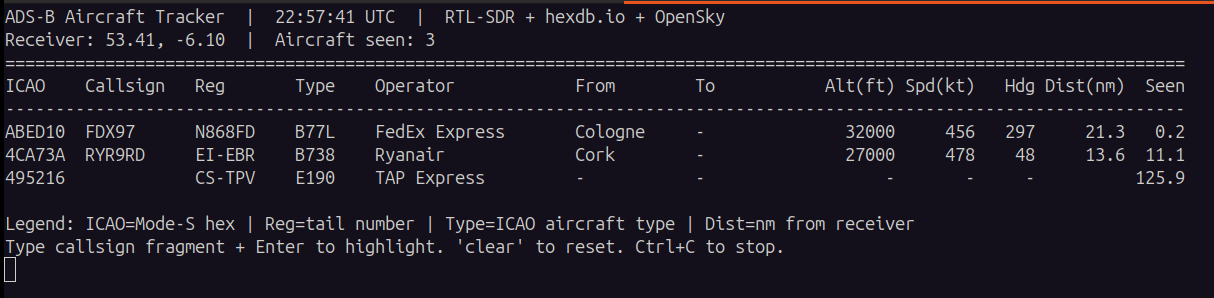
The tool is a Python script that runs dump1090-mutability as a subprocess, polls its JSON output, enriches each aircraft via online APIs, and displays a live-updating terminal table. Here’s what it looks like in action:
ADS-B Aircraft Tracker  |  22:26:50 UTC  |  RTL-SDR + hexdb.io + OpenSky
Receiver: 53.37, -6.33  |  Aircraft seen: 5
Highlight filter: 'RYR'
======================================================================================================================
ICAO    Callsign   Reg       Type    Operator            From        To          Alt(ft) Spd(kt)   Hdg Dist(nm)  Seen
----------------------------------------------------------------------------------------------------------------------
4D23FC  RYR9SA     9H-QET    B738    Malta Air           Dublin      -           8550     324    18     13.4   8.4
4CAD10  RYR6JN     EI-HGX    B38M    Ryanair             Dublin      -           6950     345    39     15.9   7.4
4CADFC  RYR58MR    EI-IHP    B38M    Ryanair             Dublin      -          34000     399   217     15.6   0.0
407CF7  DHK051     G-DHLX    B77L    DHL Air             -           -          35000     497   115      8.0   0.0
Type RYR and every Ryanair flight lights up in green. Type clear to reset. Press Ctrl+C to stop.
How It Works
Architecture
RTL-SDR (1090 MHz) --> dump1090-mutability --> aircraft.json (polled)
                                                      |
                                                      v
hexdb.io (reg/type/operator) ----+
OpenSky (origin/dest, optional) -+--> Enrichment (cached) --> Live Table
- dump1090-mutability runs as a subprocess and decodes ADS-B signals, writing aircraft data to JSON files every second.
- The Python script polls
aircraft.jsonat a configurable interval (default 2s). - Each aircraft’s ICAO hex code is looked up on hexdb.io for registration, aircraft type, and registered owner/operator. Results are cached in memory.
- If OpenSky Network credentials are provided, the script queries the OpenSky flights endpoint for origin/destination airports, converted to readable names via a built-in airport dictionary.
- An optional airband monitor (
rtl_fm) runs in parallel for activity correlation.
Key Design Decisions
- Receive-only: The tool never transmits. This keeps it legal and safe.
- Cached enrichment: hexdb.io lookups are cached so we don’t hammer the API. OpenSky tokens are cached until expiry.
- Graceful degradation: Without OpenSky credentials, the From/To columns simply show
-. The tool still works fully for ADS-B tracking. - Auto-location: If you don’t pass
--lat/--lon, the tool estimates your receiver position from the aircraft it sees. - Single file: Everything is in one Python script. No frameworks, no database, no web server.
Setup
Hardware
- RTL-SDR dongle (any RTL2832U-based receiver works)
- A 1090 MHz antenna is recommended. The default RTL-SDR dipole works but range is limited (50-150 nm). A dedicated 1090 MHz antenna makes a big difference.
- USB port (the SDR draws ~300mA)
Software
sudo apt install dump1090-mutability rtl-sdr
pip install requests
Run
# Clone the repo
git clone https://github.com/fadyanwar/adsb-airband-tracker.git
cd adsb-airband-tracker

# Run directly
python3 adsb_tracker.py --freq 118.5

# Or install as a system command
sudo bash install.sh
adsb --freq 118.5
Optional: Origin/Destination Columns
To populate the From/To columns, create a free OpenSky Network account and download client credentials:
- Register at opensky-network.org
- Create an API client in your account settings
- Save the
credentials.json(withclientIdandclientSecret) to~/Downloads/ - Run the tool — it auto-detects the credentials file
What I Learned
- ADS-B is everywhere: Even with a basic antenna, I was picking up 5-10 aircraft at any given time, some over 100 nm away.
- hexdb.io is great: Free, no auth, returns registration, type, and operator for any ICAO hex code. Essential for making raw ADS-B data human-readable.
- OpenSky OAuth2: OpenSky moved to OAuth2 client credentials. The token endpoint is at
auth.opensky-network.org. Tokens last ~30 minutes. - Airport names matter: ICAO codes like
EIDWmean nothing to most people. A built-in dictionary of ~120 common airports maps them to readable names (Dublin, Gatwick, CDG Paris, etc.). - baofeng ≠ scanner: Baofengs can’t scan entire bands. For wideband scanning, an RTL-SDR is the right tool.
GitHub Repository
The full source code, README, and install script are available at:
github.com/fadyanwar/adsb-airband-tracker
Feel free to fork, contribute, or adapt it for your own SDR setup. If you have questions or improvements, open an issue or PR.
Leave a Reply